
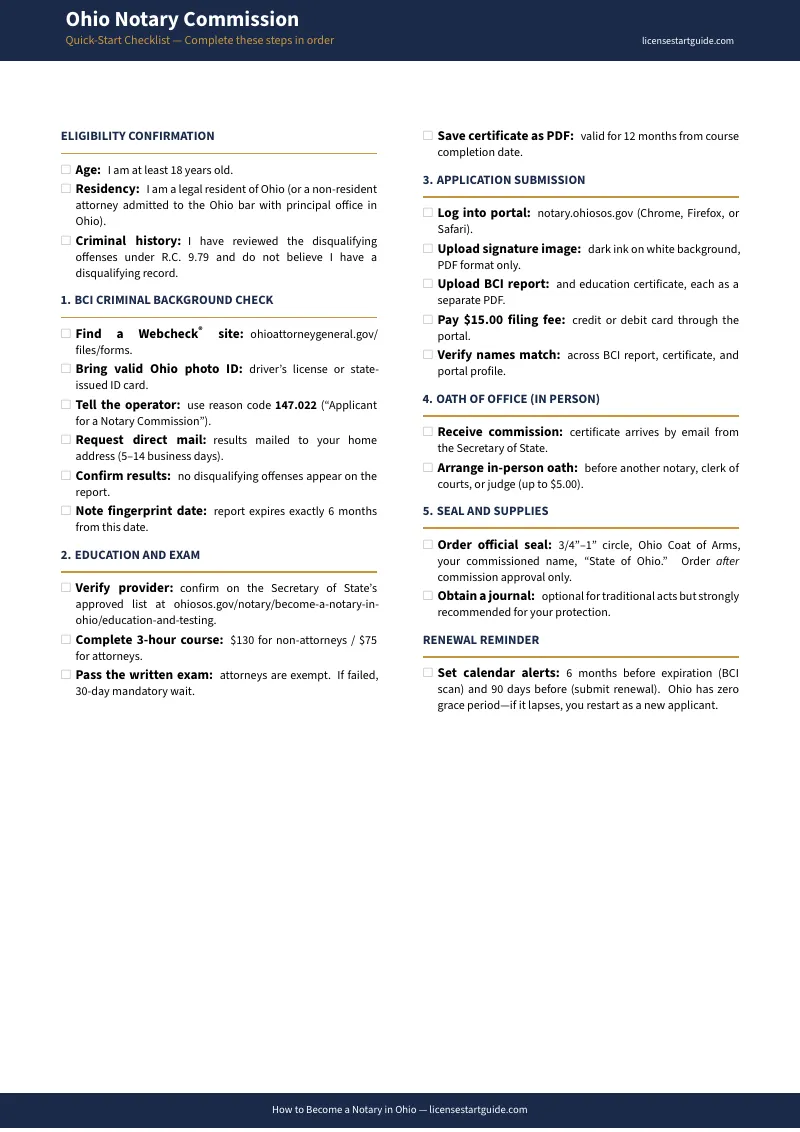
Stop Guessing at the Order — Follow the Sequence That Protects Your Money
Ohio's notary commission process looks simple until you're in the middle of it. Four separate entities — the Secretary of State's portal, a WebCheck fingerprint location, a state-approved education provider, and an authorized oath official — each with their own fees, processing times, and requirements. Do them in the wrong order, and you don't just lose time. You lose money.
Pay $130 for the mandatory three-hour training course before your BCI background check clears? If the check comes back with a disqualifying result, that $130 is gone — non-refundable. Wait too long after fingerprinting to submit your application? The BCI report expires after six months, and you'll pay the fingerprinting fee all over again. Use the wrong reason code at your WebCheck appointment? The Secretary of State's office rejects your application, and you start the background check from scratch.
The Ohio Notary Commission Process Guide is a sequencing system. It puts the cheapest, zero-risk steps first — eligibility verification, background check booking — so you confirm you qualify before spending $130+ on training. Every step comes with the exact timing, the exact fees, and the exact documents you need, so nothing falls through the gap between the state portal and your local WebCheck station.
What's Inside
- The Correct Step Sequence — because the Secretary of State's website tells you what to submit, but not when to submit it relative to your background check, your training, and your oath appointment
- BCI Background Check Walkthrough — the exact WebCheck reason code (147.022), the mailing instruction that gets results sent to your home address, and the six-month validity window you need to plan around
- Training and Exam Logistics — approved provider comparison, the 12-month certificate validity limit, what happens on a failed exam (30-day retake wait, second failure = full $130 restart), and why this step comes after your BCI results
- Secretary of State Portal Filing — account creation on notary.ohiosos.gov, document upload sequence (BCI report, training certificate, signature image), and the $15 application fee
- HB 315 In-Person Oath Guide — the new requirement for non-attorney notaries, who qualifies as an authorized official, and scheduling strategies for deputy clerks and bar association representatives across Ohio's 88 counties
- Seal and Journal Specifications — R.C. 147.04 seal requirements (size, text, Ohio coat of arms), when a journal is optional vs. mandatory, and how to avoid the $20+ markup on pre-packaged supply kits
- Vehicle Title Notarization Reference — the jurat requirement, physical appearance and ID rules, ink color preferences by county, and the blank-field/erasure rules that void titles at auto title offices
- Remote Online Notarization Roadmap — the separate application path from traditional commission to RON, the 2-hour training requirement, platform selection, digital certificate registration, and the $20 state fee
- HB 315 Bond Clarification — why standard and RON notaries owe $0 in bond costs, and the narrow exception for electronic estate planning documents ($25,000 surety bond + $25,000 E&O policy)
- Renewal Timeline Tracker — the strict 90-day window before your five-year commission expires, the 1-hour refresher course requirement, and what happens if you miss the deadline by even one day
- Fee Schedule Reference — maximum charges per act ($5 in-person, $30 RON, optional $10 technology fee, negotiable travel fees) so you price your services correctly from day one
- 23-Item Quick-Start Checklist — a printable one-page sequence you can tape to your wall and check off as you go
- Commission Cost Tracker — a fill-in budget worksheet to track estimated vs. actual expenses for every commissioning step
- Renewal Timeline Tracker — a fill-in planner for your 5-year renewal deadlines, because Ohio gives you zero grace period
- Vehicle Title Notarization Checklist — a per-transaction checklist to print and use at each vehicle title signing
- RON Application Tracker — a fill-in tracker for the Remote Online Notarization authorization process with a platform comparison table
Who This Is For
Administrative and legal professionals adding a credential. Your employer needs in-house notarization capacity, or you want to strengthen your résumé. You handle office workflows daily, but you've never navigated a state licensing portal, coordinated a WebCheck appointment, or scheduled an in-person oath with a deputy clerk. This guide handles the regulatory sequencing so you can focus on your day job.
Real estate and title agents expanding their signing services. You need to notarize closing documents, deeds, and mortgage packets — or you want to add mobile loan signing and remote online notarization. The guide covers the traditional commission as your foundation, then maps the separate RON path so you can add digital services without backtracking or paying twice.
Side-business entrepreneurs starting a mobile notary service. You want a flexible income stream on your own schedule, without the expensive all-in-one corporate bundles that steer new notaries into unnecessary bonds and premium supplies. This guide identifies exactly what you need to purchase and what you can skip — often saving over $50 compared to pre-packaged starter kits.
Why Not Just Use the Secretary of State's Website?
The Secretary of State's portal at notary.ohiosos.gov is a regulatory filing system. It accepts your application once you've completed all the prerequisites correctly. What it does not do is tell you the order those prerequisites need to happen in, warn you about the non-refundable fees you'll pay if you sequence them wrong, or explain the in-person oath requirement that HB 315 added in 2025.
The state portal also doesn't cover the practical side: which WebCheck reason code to give the operator, how to get your BCI results mailed to your home so you can upload them yourself, how to handle vehicle title notarizations without getting rejected at a county auto title office, or what a RON transition actually involves beyond the application form.
This guide isn't a replacement for the state portal — you'll still file there. It's the preparation layer that makes sure every document, fee, and appointment is in the right place before you hit submit.
Money-Back Guarantee
If the guide doesn't give you a clearer picture of your commissioning path within 30 minutes of opening it, reply to your download email and we'll refund you. No forms, no waiting period.
Start With the Free Checklist or Get the Full Guide
Download the free Ohio Notary Commission Requirements Checklist — a printable one-page sequence covering eligibility through your first official act. If you want the full 19-chapter guide with the BCI walkthrough, title transfer reference, RON roadmap, and renewal tracker, the complete toolkit is available for .